


A virtual phone system is a cloud-based communication solution that enables businesses to make and receive calls over the internet, eliminating the need for traditional phone lines or on-site PBX hardware.
The Most Trusted Provider of Virtual Phone Systems
Enhance customer experience with local calling, advanced routing, and intelligent analytics.
- Make and Receive Calls
- User-friendly Online Dashboard
- CRM, Help Desk, and PBX Integrations
- Call Summaries, Transcription, & Customized Reports
- Account Management and 24/7 Live Support
- 40+ Calling Features Included
Try for Free!
Billed at the end of 15-day free trial.
Trusted by 6,000+ Businesses Across 160+ Countries

How It Works?
1
Sign Up:
Start a free trial to set up your virtual phone number.
Start a free trial to set up your virtual phone number.
2
Integrate:
Seamlessly connect to your CRM, Help Desk, or PBX.
Seamlessly connect to your CRM, Help Desk, or PBX.
3
Customize:
Set up features like IVR and custom call routing.
Set up features like IVR and custom call routing.
4
Analyze:
Leverage AI-driven insights to improve business performance.
Leverage AI-driven insights to improve business performance.
Innovative Features in a Simple Package
Local 2-Way Voice
Make and receive calls across 160 countries with a local in-country Caller ID.
Call Routing
Easily route incoming calls globally to any landline, cell phone, PBX, or SIP address.
Advanced Routing
Route calls between continents and time zones seamlessly.
Auto-Attendant/IVR
Build customizable IVR menus to greet callers and route calls to the appropriate agent or department.
AI Call Insights
Leverage AI to analyze call traffic and optimize customer interactions.
Integrations
Easily bridge your business tools, CRMs, and help desk software with United World Telecom.
Virtual Voicemail
Customize your voicemail greeting, access voicemails via email, and read transcripts.
Control Panel
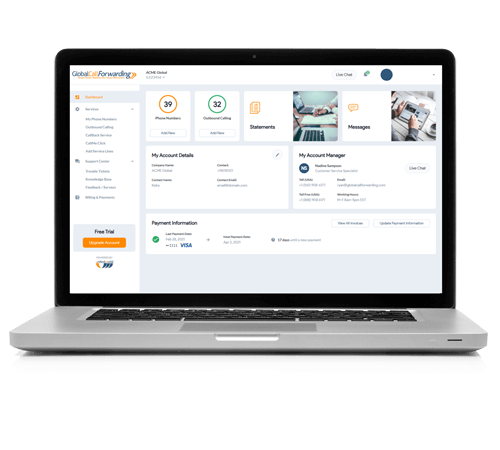
Manage your account from your online control panel via web and mobile devices.
One Stop. Real Benefits.
Scale as you grow with a reliable and growth-friendly phone service

Fast delivery Activate and set up numbers quickly

Global voice coverage Phone numbers in every major region and emerging market.

Competitive rates Compared to giant telecom operators

No extra hardware Integrate into your existing communication infrastructure
Expand Globally with Virtual Phone Numbers
Run your business communication in the cloud with virtual phone numbers that help you connect with customers locally — from anywhere in the world.
Use virtual phone numbers to:
- Let local customers call your business, wherever it is located.
- Enable teams to make and receive calls without being tied to a physical location.
- Route calls to the main office, distributed teams, VoIP & SIP devices.
- Scale voice operations across countries and time zones — all from a single phone system.
Stay agile, lower your overhead, and deliver consistent experiences with a global-ready virtual phone system.
Scott H, Mechanical Engineer at Madern
Hear from Our Satisfied Customers
Streamline Workflows by Connecting Our Services to Your CRM, Help Desk, or PBX
Upgrade business communication by bringing global telephony to your core tools and services.

Zendesk
Help Desk

Salesforce
CRM

Zoho
CRM

Hubspot
CRM

Odoo
CRM

Intercom
Help Desk

Pipedrive
CRM

Gorgias
Help Desk

3CX
PBX

Genesys
PBX

MS Teams
Direct Routing

HighLevel
CRM
A Global Voice Partner You Can Trust
Service quality and customer experience are our top priorities.
160+
Countries
Phone numbers available across the globe.
30+
Years
We've been in business since 1996.
4.2/5
Live Chat Rating
We don’t just answer questions, we make customers happy.
99.999%
Uptime
Multiple layers of redundancy = Higher reliability.
4.8
Stars
Google Reviews.
Why United World Telecom?
Need an easy-to-use business phone service that you can access from anywhere in the world? With our cloud phone solution, you get global coverage, international and local calling, high-quality voice, 99.999% uptime, and unlimited scalability. Grow your phone system along with your business!
Rely on our 24/7 responsive customer service, dedicated managers, and live tech support to ensure your service runs smoothly.

F A Q
Virtual phone systems utilize Voice over Internet Protocol (VoIP) to route calls over the internet. With United World Telecom, you can manage calls, routing rules, voicemails, and more through an online dashboard, Softphone, or integrated CRM.
Virtual phone systems offer flexibility, scalability, and cost-efficiency. You can:
• Operate remotely from anywhere in the world
• Use local or toll-free numbers in 160+ countries
• Set up advanced call routing, IVR menus, and voicemail
• Centralize and manage both inbound and outbound calls on a single platform.
Depending on your provider, you get local and global voice coverage, advanced call routing, CRM integrations, and intelligent analytics. These features help improve customer experience and streamline communication workflows.
Yes. You can use a softphone app, desk phone, mobile device, or browser to make and receive calls with our virtual system. No new hardware is required.
Yes. With our Outbound Calling service, you can make calls from your virtual number and display that number as your caller ID. This helps you maintain a consistent local identity across global markets.
Our virtual phone system offers seamless integration with various CRM, help desk, and PBX systems, such as Salesforce, HubSpot, Zendesk, and 3CX, streamlining your communication workflows.
Start by getting a virtual phone number. Sign up for a local or toll-free number for your desired country on our pricing page. Once your account is activated, you can configure features for your virtual phone system directly from the control panel.